



Choosing between ERP software can feel overwhelming, especially when multiple platforms promise to do everything. SAP Business One and Odoo are two popular options for small and medium-sized businesses, but they’re designed with different priorities in mind.
In this guide, we compare SAP Business One vs Odoo to help growing organizations understand which ERP best fits their operational needs, goals, and long-term plans. We’ll discuss the key differences, advanced features, and more, so leaders can make an informed decision when exploring the ERP market.
An Overview of SAP Business One and Odoo ERP Systems
SAP Business One and Odoo are two commonly used enterprise resource planning (ERP) solutions designed for small and medium-sized enterprises (SMEs). While both offer core ERP functionalities, they differ significantly in deployment options, customization, scalability, user-friendliness, and total cost of ownership (TCO).
What Is SAP B1?
SAP Business One is an ERP system that has been uniquely designed for small and medium enterprises, which gives the advantage of having just one complete business management solution for accounting, purchasing, sales, inventory, production, customer relationship management (CRM), and more.
The software has a wide application. In fact, it is ideal for businesses that have outgrown entry-level software and are looking for an industry-specific solution tailored to various business processes. Whether it is deployed on-premises or in the cloud, this flexibility allows SAP Business One customers to decide on the best suitable business model for them.
What is Odoo?
Odoo is a modular ERP system with a lot of interesting modules. It has about 30 core apps and thousands of third-party add-ons. It is an open-source and highly customizable software solution. It also allows a company to use its servers (with the requirement of a high level of programming knowledge). One of the appeals for companies with simpler needs is Odoo’s flexibility.
Odoo vs SAP: ERP Software Comparison Chart
| Key Features | SAP Business One | Odoo ERP |
|---|---|---|
| Master Data | Offers a structured Business Partner (BP) master with clearly separated customer and vendor records, supporting standardized data governance and financial reporting. | Uses a contact-based model that prioritizes flexibility. Additional configuration may be required to clearly distinguish customers and vendors as data complexity increases. |
| Deployment Options | Cloud and on-premise. | Cloud-first, on-premise is also available. |
Available to Promise (ATP) | ATP comes standard and is accurate and easy to interpret. | Offers a similar capability starting only from v16 (“Forecast”), but it lacks clarity and depth in functionality. |
Financial Reporting | Includes a broad set of standard financial reports designed to work with complex charts of accounts and multi-entity structures with minimal configuration. | Provides financial reporting that can be adapted to existing accounting structures, though organizations with complex COAs may require additional configuration or customization to meet reporting needs. |
| BP Detailed Aging Reports | Strong, audit-ready aging reports with side-by-side system currency vs. BP currency details. | Lacks key BP visibility, requires customization, and becomes even more complex for multi-currency customers. Standard views do not provide SAP’s detailed multi-currency comparison. |
| Training/Ease of Use | Offers deep capabilities but involves a steeper learning curve. SQL knowledge is often needed to build queries. | The web interface is intuitive, user-friendly, and offers simpler training. Users do not need SQL to extract data; field relationships are pre-connected. |
| Pick & Pack Management | Provides detailed, item-level pick/pack management out of the box. | Only shows high-level order value, not item-level detail. Requires add-ons for printing, view filtering, and operational daily use—introducing manual work and confusion for warehouse teams. |
| BP Catalog no. | Fully supported as standard functionality. | Not included by default (even in v16) and must be custom-built. |
| User Interface | Traditional thick client interface; structured and highly functional once users learn the layout. SAP’s Web Client offers a more intuitive and contemporary UI. | Modern, web-native interface that is intuitive for users familiar with contemporary cloud applications, often reducing onboarding time for non-technical teams. |
| Integration Capabilities | SAP Integration Framework (B1iF) enables integrations via APIs. The Service Layer and SDK (software development kit) are also available for integration purposes. | APIs are available but require lots of technical support, often from third parties. |
| e-Commerce Integration | Seamless with Shopify, Magento, WooCommerce and more. aclaros uses SAP’s exclusive middleware solution that is embedded into SAP’s tech stack for integrations. | Marketplace integrations are available, but may require customization and partner management. |
| User Authorizations | The authorization module is easy to use by users. | It can be customized to the granular level of a field or view, but not user-friendly. Will require the assistance of consultants. There’s no standard authorization module with the granularity of SAP. |
| Licensing/Affordability | Higher license costs per user that reflect its depth of functionality, particularly in financial management, inventory management, and process control. | Lower per-user pricing can enable wider system access across teams, especially in the warehouse, for greater visibility. |
| Messages & Alerts | Comes with standard alerts. | Super users can create alerts using simple logic (no SQL), and light Python knowledge can unlock powerful automated actions. |
| Pre-defined Queries, Filters & Reports | Comes with meaningful pre-defined queries, dashboards, and accurate financial reports. | Offers no comparable pre-built reports; users or consultants must create them manually, and many views require customization. |
| Approval Process | Offers a mature, built-in approval workflow framework. | Lacks standard approval workflows. Approvals require customization and do not have a dedicated approval module. |
| Upgrade Experience | Designed to preserve core configurations and user-defined fields during upgrades, reducing disruption for standardized implementations. | Upgrades require validation of customized views and modules, particularly in highly tailored environments, making upgrade planning an important consideration for customized deployments. |
| Currencies | Offers strong multi-currency capability. Key features include business partner currency view, automatic exchange rate updates and automatic multi-currency financial reporting. | Detailed aging reports require customization, and companies with multiple currencies often need additional setup to maintain accuracy. |
Best Practices | SAP is built on best practices that have been honed for over 40 years across multiple industries and business complexities. | Odoo is built on specific software engineering best practices, but due to its open-source platform and potential for high customization, the degree to which best practices are followed depends heavily on the partners/developers. |
A Comprehensive Look at Key SAP B1 & Odoo ERP Features
While both Odoo and SAP Business One are popular ERP software choices for businesses, each solution offers unique features and benefits. The following breakdown compares key capabilities between SAP vs Odoo to help you determine which solution best fits your business needs.
Supports growing SMEs with multi-entity, multi-location, and multi-currency operations.
Handles increasing transaction volumes within a single, centralized ERP environment.
Scales functionality through built-in modules and certified integrations rather than heavy customization.
Designed to maintain performance and stability as operational complexity increases.
Its modular and flexible nature enables businesses to scale at their own pace by adding functionalities as their needs evolve.
While large datasets or complex operations can make performance variable, responsiveness can be optimized by adding “workers” and fine-tuning system configurations.
This enables Odoo environments to better support higher transaction volumes and concurrent users as needs expand.
SAP Business One’s SAP Integration Framework (B1iF) seamlessly connects the solution with third-party applications: Shopify, Salesforce, HubSpot, Magento, and many more.
This promises scalability without the headaches of relying on multiple third-party tools and coordinating with each of the vendors every time you upgrade or encounter a bug, which only leads to more finger-pointing.
Odoo integration is offered through APIs and an app marketplace.
Includes extensions built by a wide range of providers, from established vendors to individual developers.
Requires evaluation of each app’s maturity, documentation, and support model.
Long-term stability depends on selecting well-supported integrations and planning for ongoing maintenance.
Offers a robust digital core with industry-specific modules for CRM, accounting, inventory, supply chain management, manufacturing, and project management.
Supports customization primarily through configuration and certified add-ons rather than heavy custom code.
Uses the SAP Integration Framework (B1iF) to connect third-party applications within a governed ecosystem.
Uses a modular design architecture with over 30 core modules and thousands of third-party add-ons.
Since the ecosystem is so diverse, businesses benefit from due diligence in selecting apps that meet their operational and support expectations.
Organizations should be aware that many third-party modules follow varying development and support standards.
Ongoing compatibility and maintainability may require validation and technical support as the system evolves.
Available in both on-premise and cloud-based deployments.
Supports different regulatory, compliance, and data sovereignty requirements.
Allows organizations to choose deployment based on IT strategy and infrastructure preferences.
SAP Business One is recognized as a global leader for robust compliance management capabilities. By integrating compliance into its core business operations, businesses can transform regulatory requirements from a challenge into a strategic advantage.
Primarily offered as a cloud-based ERP for cost efficiency and ease of access.
Supports on-premise deployments for organizations that require greater infrastructure control.
On-premise environments require management of servers, security, updates, and backup policies.
Best suited for teams that are prepared to support or outsource infrastructure management.
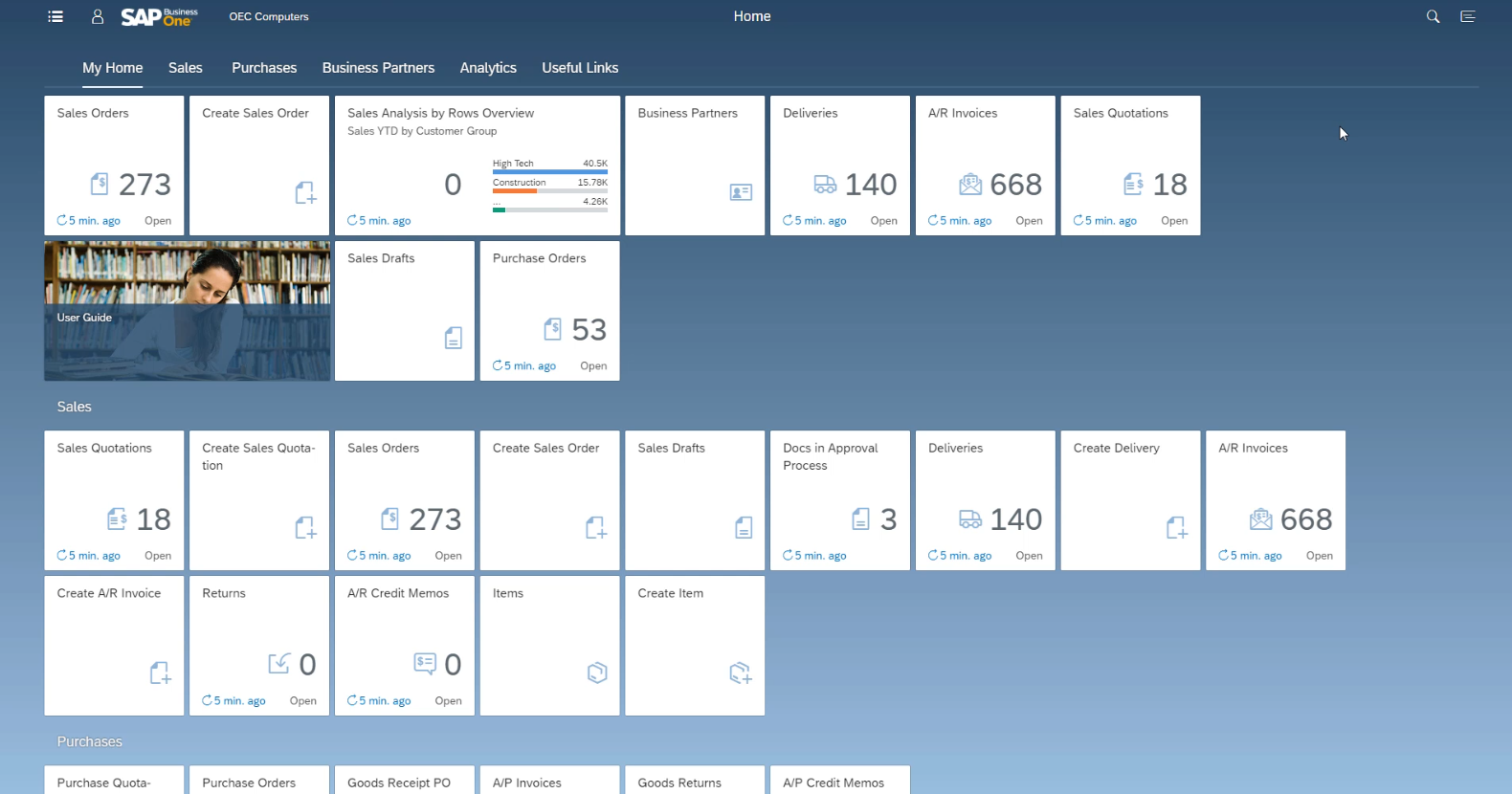
The SAP Business One system comes with a “fat client” desktop application featuring intuitive navigation and a customizable cockpit, segmented by functions like sales, service, or finance.
Features customizable dashboards and widgets that surface key tasks, reports, and KPIs.
Offers a Web Client based on SAP Fiori design principles for browser-based and mobile access.
Web Client focuses on usability and accessibility, with core business functions available for users working remotely or on the go.
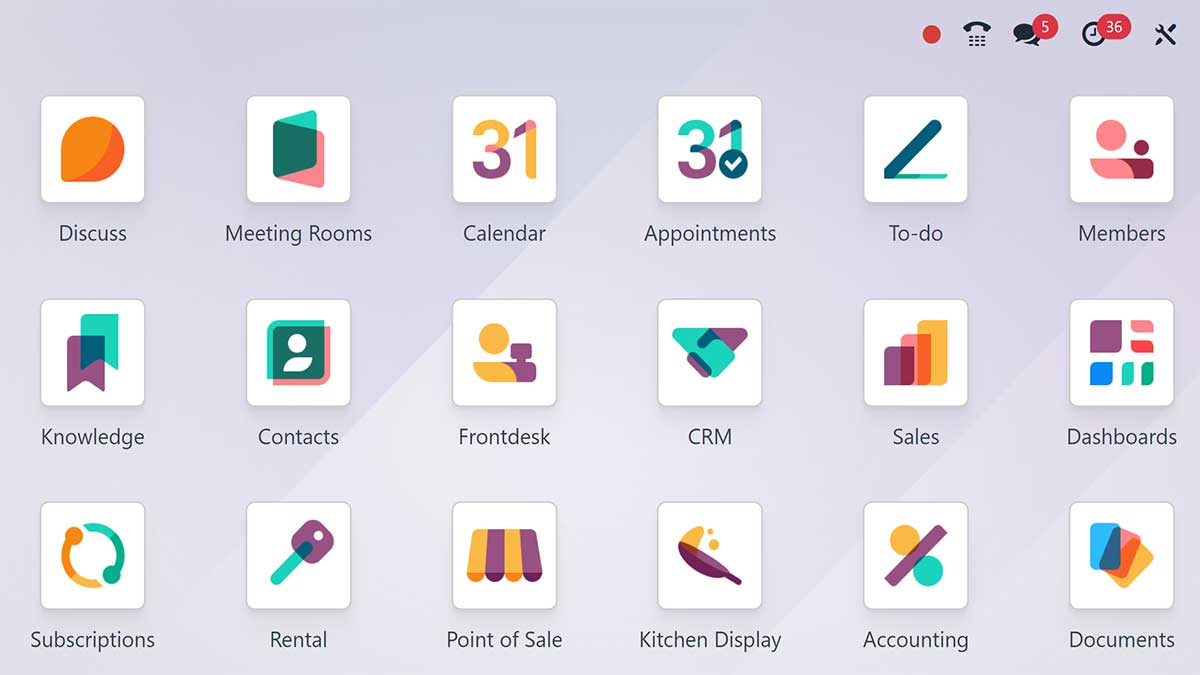
Has an appealing, modern, and sleek user-friendly interface.
Familiar design patterns make it approachable for users accustomed to cloud-based applications.
Supports customization of views and workflows, though more complex configurations typically require technical expertise.
Businesses with highly specific, complex processes might need additional configuration or support beyond the standard content; Odoo offers paid service options for this.
Supported by a mature and extensive global partner ecosystem of over 850 partners worldwide.
This vast network ensures that businesses receive robust training, seamless implementation, and ongoing support tailored to their specific needs.
SAP solutions are highly governed by SAP policies, certifications, and annual compliance measures.
Such a comprehensive ecosystem minimizes downtimes during deployments and provides users with a wealth of resources.
SAP Business One’s unmatched advantage lies within its vast library of certified add-ons. All add-ons undergo rigorous certification processes to meet SAP’s standards for quality and integration.
Well-suited for organizations that value structured support models and standardized implementation practices.
Backed by a growing community and direct support in the case of the enterprise version.
Odoo’s community version is open-source software and free to use, relying on forums and shared resources without official Odoo support.
Odoo Enterprise includes direct support, with additional services available through Success Packs or partners.
Many organizations will select either support or development packages to ensure their environment runs smoothly.
Ongoing support and development costs can vary based on system complexity and customization requirements.
Offers both CAPEX (perpetual license) and OPEX (subscription) pricing models.
Allows organizations to choose a cost structure aligned with their financial strategy.
Total cost is typically more predictable over a 3–5 year horizon.
Pricing reflects bundled functionality and reduced reliance on third-party add-ons.
Odoo pricing appears to be cheaper upfront, with a free community version available.
Scaling into Odoo Enterprise or adding third-party modules requires greater investment.
Total cost remains lower for organizations using mostly standard features.
Advanced customization or integrations may require additional support or development investment.
SAP Business One vs Odoo: Final Thoughts
Ultimately, choosing between Odoo vs SAP Business One will depend on your company’s size, operational complexity, and growth ambitions. Both platforms can support core ERP requirements, but they are built with different priorities in mind.
For small and medium-sized companies that expect to scale, operate across multiple locations, or require industry-specific functionality in an ERP solution, SAP Business One offers a more structured and predictable ERP foundation. Its depth across finance, inventory management, and integrations makes it well-suited for organizations that want to grow without continually re-engineering their systems.
Odoo might be more feasible for start-up companies or organizations with relatively moderate, less complex needs that value flexibility and lower upfront costs. Its modular design allows companies to get started quickly, though organizations should be prepared to invest in additional configuration, technical resources, or partner support as complexity increases.
By evaluating your current needs alongside future goals, you can select the ERP system that best supports sustainable growth, operational stability, and long-term success.
Why SAP B1 May Be Right for Your Business
- Rich functionality: Expect solid out-of-the-box functionality with reduced reliance on third-party tools.
- Industry-specific solutions: Industry-specific modules, along with seamless integrations to meet the unique needs of diverse industries.
- Scalability: Pre-configured to grow with your business; get set to scale your operations seamlessly with SAP Business One.
- Value for money: Over time, assurance of better TCO for businesses that have comprehensive needs than that offered by Odoo.
- Global community: Wide-reaching network of expert resources, a strategic advantage in terms of reliability, support, and training.
Connect with aclaros to Discover the Right ERP System for Your Business
At aclaros, we work with businesses to evaluate ERP systems objectively, helping you determine what truly fits your ecosystems, teams, and roadmap. Whether that’s SAP ERP software or solutions better suited to large enterprises.
Our consultants bring real-world implementation experience across a range of ERP platforms, including SAP Business One, and can guide you through key considerations such as scalability, integrations, and total cost of ownership.
If your organization is assessing ERP options or simply looking into Odoo alternatives, connect with aclaros to start a conversation and receive guidance tailored to your business needs.

FAQs
Which is better, SAP or Odoo?
The right ERP system—whether that’s Odoo ERP or SAP B1—comes down to your business requirements. For small and medium-sized businesses that require industry-specific functionality and long-term scalability, SAP Business One is a solid choice. Odoo offers flexibility and lower upfront costs, but often requires more customization and technical involvement.
What is Odoo used for?
Odoo is an open-source ERP software used to manage accounting, sales, inventory, human resources, customer relationships, and even e-commerce. Its modular design allows businesses to mix and match various components to get an all-in-one business management software.
Can Odoo replace SAP?
Odoo can be a viable alternative for start-ups and small businesses with simple requirements.
For established organizations with more complex operations, SAP B1 typically offers stronger financial management, advanced functionality, scalability and structural depth.
What is the disadvantage of using Odoo?
Odoo often requires greater technical effort for configuration, customization, and ongoing maintenance. As transaction volumes and complexity grow, performance and scalability may require additional optimization and support.
What are the best alternatives to Odoo for SMEs?
For SMEs looking for alternatives to Odoo, some of the best options include:
- SAP Business One: A scalable ERP with robust financial and operational management.
- NetSuite: A cloud-based ERP with strong automation and reporting features.
- Microsoft Dynamics 365 Business Central: A flexible ERP with seamless Microsoft ecosystem integration.
- Acumatica: A cloud ERP offering industry-specific solutions.